It knows your whole Shopify catalog.
In real time.
Products, prices, availability: it reads your store live, answers with the right details and shows the product card in the chat with photo, price and a button to add it to the cart.
14 days free to try the assistant · Cancel anytime
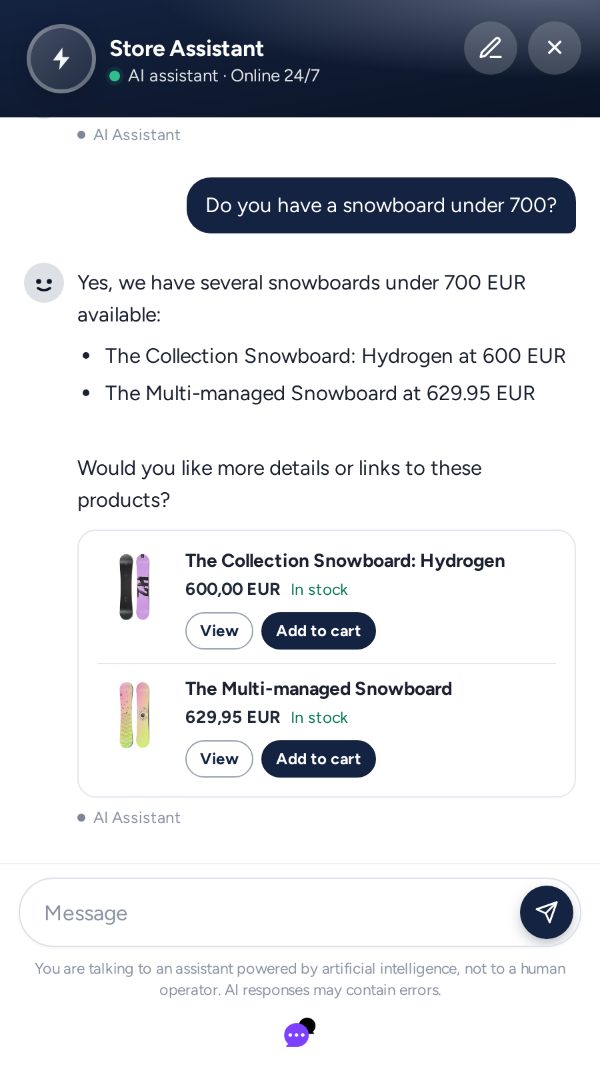
Live product search, in your Shopify catalog.
Try it now
Ask the demo store: it reads its Shopify catalog live.
This assistant is connected to a Shopify test store with sample products. It answers with real products, prices and stock, and shows the cards with the button to add them to the cart.
How we handle the data of this conversation: Privacy policy.
How to connect it
Ready in a few steps
Install it from the Shopify App Store and connect it to your AnyDialog account. No developer, no code to paste.
-
1
Install the AnyDialog app
1 minDetails
In the Shopify App Store press Install and approve: the app reads the store catalog, it does not change it.
-
2
Connect your account
2 minDetails
Inside the app press «I have an account» or «Create the account»: AnyDialog opens, you sign in and confirm the store.
-
3
Choose who answers
1 minDetails
Still in the app, choose the agent that talks to your store visitors. If you don't have one, create it on AnyDialog in a few minutes.
-
4
Turn on the chat in your theme
1 minDetails
The app button opens the theme editor with AnyDialog already on: press Save and the chat shows up in your store.
What it can do
What it can do with Shopify
It connects straight to your store: every search is live, not yesterday's copy.
Searches the catalog live
The customer describes what they want in their own words. The assistant searches your store and suggests the best products.
-
Compares prices
To «what is the cheapest option?» it answers right away, with prices taken from Shopify.
-
Checks availability
Is the 42 in blue there? It checks whether that variant is on sale right now and says it as it is.
-
Knows the variants
Colour, size, material: it knows which variants are on sale and tells the customer.
-
Product card in the chat
Next to the answer: photo, price, availability, the link to the product page and a button to add it to your store's cart.
-
Searches by collection
To «what is in the summer collection?» it reads that collection and suggests its products.
-
Where is my order
If you turn it on, it tells whoever gives the order number and the email used to buy: status, items and tracking. Nobody else.
-
Direct links to products
Every suggested product links to its Shopify page: one tap from the chat to the product.
It works on every channel
Same knowledge, same tone, same actions, wherever people write to you.
Good to know
What is worth knowing before you connect Shopify.
- Reads, never changes. It searches and shows the products in your catalog. It does not change orders, prices or stock.
- The cart, not the payment. From the card the customer adds the product to your store's cart. Payment is completed on your site, as always.
How many customers ask "do you have it in red?" while you are away?
Install the app from Shopify and connect your account. No developer.
Join the waiting list14 days free to try the assistant · Cancel anytime